Integrate MetricBridge into your platform
Your users bring their own Apple Health. Each one points the MetricBridge iPhone app at an endpoint you give them, and from then on their phone POSTs signed JSON to you: daily and intraday metrics, workouts, sleep sessions, time zone changes and logged events. No MetricBridge server sits in the path and we never hold a copy.
Last updated 19 October 2026 · applies to MetricBridge 1.11 and later · wire contract · OpenAPI 3.1 · platform kit · licence terms
On this page
How it works
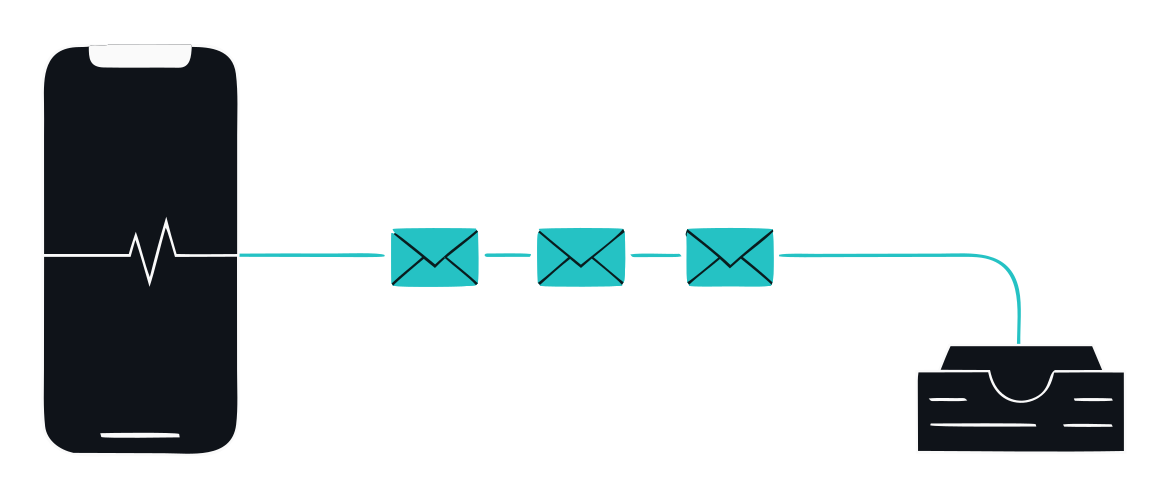
No MetricBridge server in the path. No account. Nothing stored by us.
- You give each user an endpoint and a token. Both are yours: the URL identifies the user on your side and the token is the per-user secret that signs every request.
- The user turns it on in the app. Settings › Webhook (optional): destination URL, ingest token, auth method. One tap tests the connection. The exact steps, ready to paste into your help centre, are below.
- Their phone sends, on their schedule. Background export runs on the cadence they chose (the default is every 60 minutes, when iOS allows and only while the phone is unlocked). Every request carries a Standard Webhooks signature you verify before you parse.
- You store and use it. Upsert per metric and day, per workout id; replace sleep sessions by day and the whole document for time zones and events. Then your product does its job on data the user chose to send you.
What you receive
Type (X-MetricBridge-Type) | What it is | Cadence |
|---|---|---|
metrics.daily | One value per metric per day, up to 190 Apple Health and Watch metrics, merged by Apple across the user's sources | Every export run (the recent days again each time) |
metrics.intraday | Hour-by-hour values for the current window, from the app's hourly automations | When the user has an hourly automation on |
workouts | Workouts with activity type, duration, distance, energy and, when present, heart rate and running or cycling dynamics | Every run that includes workouts |
sleep.sessions | Clustered sleep sessions attributed to the waking day, with stages and naps | Opt-in per user, after the run's metrics envelope succeeded |
timezone.changes | Which time zone the phone was in, from which day | Opt-in; when changed, else at most every 20 hours |
events | Events the user logged in the app: medication, habits, travel, episodes, with tags | Opt-in; when changed, else at most every 20 hours |
Two things you do not receive, so your product does not promise them: per-source values (each daily number is the single figure Apple Health produces after merging the iPhone, the Watch and other apps) and raw samples (the export is daily or hourly aggregates, not every heartbeat). What the user does not grant in Apple Health never leaves the phone, and the app's "sensitive categories" switch is theirs, not yours.
Versioning is additive: new optional fields and new types can appear at any time, so accept and ignore what you do not know. A
breaking change would ship under a new X-MetricBridge-Schema value and a new /v2/ schema path.
JSON Schemas and examples are published for every body.
Provision each user
The app knows nothing about your users. Everything that identifies a person on your side has to be in what you give them:
- Endpoint. Either a path per user (
https://api.yourplatform.com/metricbridge/u_8f31) or one shared path where the token identifies the user. A path per user is simpler to reason about and lets you revoke one person without touching the rest. Must behttps: the app refuses plainhttpfor anything but local-network and Tailscale addresses. - Token. A random secret of at least 32 bytes, one per user, generated by you. It is the HMAC key for every request from that phone, so treat it like a password: store only a hash plus a lookup key, and let the user rotate it from your settings page.
- Auth method. Recommend Header (the app sends
x-health-token). Bearer, query string and JSON body also exist; the query string is the one to avoid, because the token ends up in access logs.
Show the three values on one screen in your product with copy buttons. The user pastes them once.
Verify every request
Each request carries the Standard Webhooks v1 headers. Verify the signature over the exact bytes you received, before you parse anything, with the user's token as the key:
| Header | Meaning |
|---|---|
webhook-id | Unique per message (msg_…). Your idempotency key. |
webhook-timestamp | Unix seconds when the phone sent it. Reject outside your tolerance (5 minutes is the norm). |
webhook-signature | v1, + base64(HMAC-SHA256(token, id.timestamp.body)). Several space-separated values may appear; any match is valid. |
X-MetricBridge-Type, X-MetricBridge-Schema | Which body this is and its schema major (1). |
X-MetricBridge-Replay | Present on every request of a "Resend past days" run. Same bodies; upsert, do not double count. |
Node (no dependencies)
import crypto from 'node:crypto'

// headers: lower-cased names; raw: the request body as a Buffer, exactly as received
export function verify(token, headers, raw, toleranceSeconds = 300) {
  const id = headers['webhook-id'], ts = headers['webhook-timestamp'], sig = headers['webhook-signature']
  if (!id || !ts || !sig) return false
  if (!/^\d+$/.test(ts) || Math.abs(Date.now() / 1000 - Number(ts)) > toleranceSeconds) return false
  const expected = Buffer.from('v1,' + crypto.createHmac('sha256', token).update(`${id}.${ts}.`).update(raw).digest('base64'))
  return sig.split(' ').some((s) => {
    const b = Buffer.from(s)
    return b.length === expected.length && crypto.timingSafeEqual(b, expected)
  })
}
Python (standard library)
import base64, hmac, hashlib, time

def verify(token: bytes, headers: dict, raw: bytes, tolerance: int = 300) -> bool:
    msg_id, ts, sig = headers.get("webhook-id"), headers.get("webhook-timestamp"), headers.get("webhook-signature")
    if not (msg_id and ts and sig) or not ts.isdigit() or abs(time.time() - int(ts)) > tolerance:
        return False
    mac = hmac.new(token, f"{msg_id}.{ts}.".encode() + raw, hashlib.sha256).digest()
    expected = "v1," + base64.b64encode(mac).decode()
    return any(hmac.compare_digest(s, expected) for s in sig.split(" "))
Known-answer vector, the same one the app's own tests use: token tok_secret, id msg_test, timestamp
1700000000, body {"data":{"metrics":[]}} gives
v1,0QJjrh8MGoEkAarUDlduSSytrxEA12L3Bte3lgJfNN8=. If your implementation produces that string, it is right.
Using an official Standard Webhooks library instead? They take the secret in the whsec_ form: pass
"whsec_" + base64(token) and verify with the three headers as usual. For tok_secret that is
whsec_dG9rX3NlY3JldA==.
| Library (official Standard Webhooks) | Verify call, secret in the whsec_ form |
|---|---|
JavaScript / TypeScript: standardwebhooks (npm) | new Webhook(secret).verify(rawBody, headers), throws on failure |
Python: standardwebhooks (PyPI, 1.0.1 or later) | Webhook(secret).verify(raw_body, headers) |
Go: github.com/standard-webhooks/standard-webhooks/libraries/go | wh, _ := standardwebhooks.NewWebhook(secret); err := wh.Verify(rawBody, headers) |
Ruby: standardwebhooks (RubyGems) | StandardWebhooks::Webhook.new(secret).verify(raw_body, headers) |
Java / Kotlin: com.standardwebhooks:standardwebhooks | new Webhook(secret).verify(rawBody, headers) |
PHP: standard-webhooks/standard-webhooks (Packagist) | (new \StandardWebhooks\Webhook($secret))->verify($rawBody, $headers) |
Rust: standardwebhooks (crates.io) | Webhook::new(secret)?.verify(body, &headers)? |
.NET: StandardWebhooks.StandardWebhooks (NuGet) | new Webhook(secret).Verify(body, headers) |
Two details that bite: hand the libraries standard, padded base64 after whsec_ (Python releases before 1.0.1
rejected unpadded secrets), and remember the prefix is not part of the key: the app signs with the raw bytes of the token. The spec
asks for 24 to 64 random bytes of secret, which is why we tell you to mint the token rather than let users type a short one.
standardwebhooks.com/verify checks a captured request by hand.
Then check the token itself if you want a second factor (header, bearer, query or body, whichever the user chose), answer 2xx fast, and do the work afterwards. The app treats a 3xx as a failure (it never follows redirects) and a 2xx that returns an HTML page as a failure too.
Store it correctly
| Type | Rule |
|---|---|
metrics.* | Upsert on metric name + date. The app re-sends the recent days on every run, and late-arriving Apple Health samples can change a past day. |
workouts | Upsert on workout id. |
sleep.sessions | Delete what you hold for the covered days, then insert. Sessions split, merge and move when a source syncs late. |
timezone.changes, events | Replace the whole document. An event missing from the list was deleted by the user. |
| any | Skip a webhook-id you already processed. Accept, and ignore, a type you do not know. A body with "_test": true is the app's connection test: answer 2xx, store nothing. |
The reference receiver implements every rule in 180 lines of dependency-free Node and is the receiver the app is tested against in CI. Read it before you write yours.
Onboard your users
These are the exact labels in the app, so your help centre can say them verbatim. Paste the block, fill in your three values.
Connect Apple Health with MetricBridge
1. Install MetricBridge on your iPhone and allow the Apple Health categories you want to share.
2. Open MetricBridge › Settings and scroll to Webhook (optional).
3. Paste your personal endpoint into the URL field, paste your token into Ingest token, and leave Auth method on Header (x-health-token).
4. Tap Test connection. You should see "Your server accepted every request".
5. Optional, under Also send to your server: switch on Sleep sessions, Time zone changes or Events if you want them too.
6. Make sure Background export is on under Schedule. Your phone will now send new data on its own while it is unlocked.
7. To send history, tap Resend past days, pick a range (up to a year) and keep the app open until it finishes.
To stop sharing at any time, clear the URL or switch Background export off. Nothing more will be sent, and you can ask us to delete what we hold.
Two honest notes for your copy: the app is a one-time purchase (US price $24.99) that the user makes on the App Store, not through you, and it is a general wellness tool, not a medical device. Do not describe the data as clinical-grade or the integration as monitoring.
Prove it with the platform kit
metricbridge-platform-kit.mjs is a single dependency-free Node 18+ file that sends your endpoint the same requests the app sends, built from the published synthetic examples, and then runs a conformance suite against the contract. No phone and no real data needed; run it from your laptop or in CI.
curl -O https://www.healthexport.dev/examples/metricbridge-platform-kit.mjs

# one of each body type, signed with the token you provisioned for a test user
node metricbridge-platform-kit.mjs send  --url https://api.yourplatform.com/metricbridge/u_test --token <token> --type all

# the conformance suite: exits 1 if a MUST rule fails
node metricbridge-platform-kit.mjs check --url https://api.yourplatform.com/metricbridge/u_test --token <token>
send also fires the awkward cases one at a time so you can watch your receiver handle them:
--duplicate (same webhook-id twice), --stale (a 20-minute-old timestamp, expect a rejection),
--bad-sig (wrong secret, expect a rejection), --replay (a Resend delivery) and --test
(the app's connection test body). Its exit code is 0 only when your endpoint did the right thing.
What check proves, each line naming the rule it comes from:
- MUST the connection test is accepted; every published body type gets a 2xx that is not an HTML page and not a redirect;
an unknown type is accepted and ignored; a repeated
webhook-idis accepted (idempotent); a resend is accepted; a 1.5 MB envelope (a week of 190 metrics, what a resend sends) is accepted; a request with a wrong signature and no token is rejected. - SHOULD a forged signature with a valid token is rejected; a 20-minute-old timestamp is rejected; answers arrive within 10 seconds.
The kit passes the reference receiver with zero warnings, and the kit's own tests run it against a deliberately broken receiver to make sure each rule fails for the right reason. Both run in this site's CI on every change to the contract.
Encryption, resend, limits
What to size your receiver for. These are the delivery semantics, read from the app's code and the contract:
| Property | MetricBridge |
|---|---|
| Delivery guarantee | At least once. Every scheduled run re-sends the recent days, and Resend re-sends up to a year, so duplicates and re-stated values are normal. Dedupe on webhook-id, upsert on content. |
| Ordering | Not guaranteed between requests. Each request is self-contained (a metric point carries its own date). |
| Retries inside a run | None. A request that fails (non-2xx, 3xx, HTML 2xx, timeout) is reported in the user's History and the next scheduled run covers the recent days again. There is no retry queue on the phone. |
| Timeout | 45 seconds per request. Answer 2xx first, process after. |
| Cadence | Background export every N minutes as the user set it (default 60), opportunistic under iOS, only while the phone is unlocked. Expect a few runs a day, not a stream. |
| Requests per run | One per enabled automation: Daily Metrics, Vitals (Intraday), Sleep, Workouts (the automation-name header carries these English names), then the opt-in typed documents. |
| Payload size | A daily envelope is typically tens of kilobytes. A Resend week of hourly vitals and every metric can reach a few megabytes. Accept at least 10 MB per request; the reference receiver accepts 50 MB. The kit's 1.5 MB check is the floor. |
| Schema versioning | Additive at any time (tolerate unknown fields and types). Breaking changes only under a new X-MetricBridge-Schema and /v2/ schema path. |
| Signatures | One v1, signature per request today, keyed with the user's token. Rotating a user's token means the user pastes the new one; accept both for a grace period if you want zero-gap rotation. |
- Encryption. A user can switch on export encryption for the webhook destination with a passphrase they choose. You then receive
a sealed envelope (
"format": "metricbridge.enc", AES-256-GCM, PBKDF2-HMAC-SHA256 with 600,000 iterations) that only the passphrase opens. The signature still covers the sealed bytes, so verify first, then decrypt with the passphrase the user gave you. The reference receiver stores the sealed envelope unopened. Details: contract and envelope.mjs, a working decryptor. - Resend. Settings › Also send to your server › Resend past days re-reads Apple Health for up to 366 local days and sends the
same bodies, one request per week of data per automation, all carrying the same
X-MetricBridge-Replayvalue. The phone must stay unlocked with the app open while it runs.
Your responsibilities
Because the data goes from your user's phone straight to you, you are the one who holds it. In plain words, and as the licence terms put it:
- You are the controller. Your privacy notice, your lawful basis, your retention, your deletion. MetricBridge is not your processor: we never have the data and we do not sign business associate agreements or health-data processing agreements.
- Wellness, not medical. MetricBridge is a general wellness tool. Do not use the integration for diagnosis, treatment, clinical monitoring, triage or anything a medical device does, and do not describe it that way to your users.
- The user is the customer for their data. No integration where an employer, insurer, school, coach-by-default or any other third party sees an individual's data without that person choosing it, and none for decisions about a person (employment, insurance, credit, legal). Minors never.
- Tell people, and let them leave. Say in your product what you receive and why, honour a deletion request, and never sell or use the data for advertising. These are also Apple's conditions on HealthKit-derived data, which bind your product's own App Store presence.
- Breach duties are yours. Depending on where you and your users are, health data you hold can bring the UK GDPR and EU GDPR special-category rules, the US FTC Health Breach Notification Rule and state laws such as Washington's My Health My Data Act. Get your own advice; we cannot carry it for you.
Licence and support
The wire contract, the schemas, the reference receiver and the platform kit are open and free to use under the licences on each file. Building a product on the integration, using the MetricBridge name to say so, and getting us on the other end of the line when something breaks is the platform licence. Its terms are public at /platforms/terms/.
To start a pilot, or to ask a question before you write any code: email the founder. It goes to one person who replies personally. Please never send anyone's health data.